ADAS is no longer “nice to have”. As more vehicles on NZ roads include advanced driver assistance systems, workshops are increasingly expected to handle calibration as part of everyday repair, replacement, and servicing work.
This guide covers what ADAS calibration actually is, what workshops need to do it properly, and how to plan an ADAS setup that fits your space, workflow, and vehicle mix.
For a broader overview of category planning, start here: workshop equipment guide.
What ADAS calibration actually involves
ADAS features rely on sensors and cameras (and sometimes radar) to interpret the road environment. Calibration is the process of ensuring those sensors/cameras are aligned and “seeing” correctly after events like:
Windscreen replacement
Wheel alignment or suspension work
Collision repairs
Steering or ride-height changes
Some diagnostic/service procedures
In practical workshop terms, ADAS calibration is about accuracy and process. The equipment matters, but the setup and workflow matter just as much.
Explore category options here: ADAS systems →
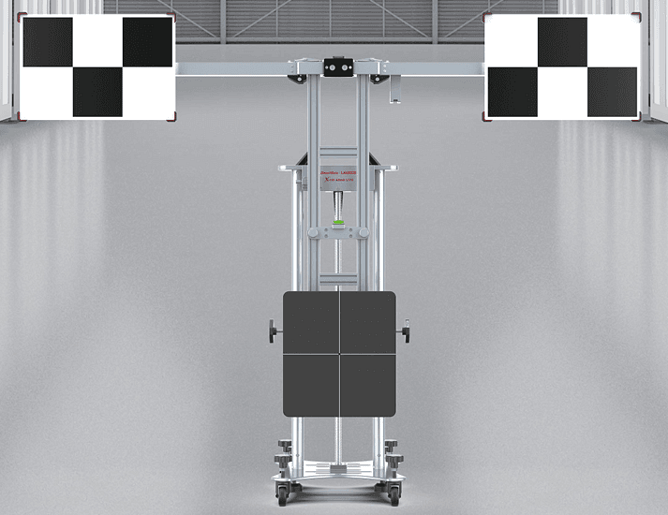
What your workshop needs to plan for
Before purchasing ADAS calibration equipment, confirm these fundamentals.
1) Space and environment
ADAS calibration typically needs a controlled area with:
Enough clear distance for targets and vehicles
Consistent lighting (avoid glare and inconsistent shadows)
A repeatable setup so calibrations aren’t “different every time”
If your workshop is tight on space, planning is even more important than buying the fanciest kit.
2) Workflow and time per job
Calibration isn’t always a “quick add-on”. You need to plan for:
Vehicle preparation time
Setup time (targets, positioning, measurements)
Calibration time + verification steps
Documentation/reporting if required
Workshops that succeed with ADAS typically build a repeatable process rather than treating each job as a one-off.
3) Capability and vehicle mix
The “right” ADAS setup depends on what you see most:
Passenger and light commercial
Mixed fleets
Newer vehicles with higher ADAS penetration
If you’re unsure, start by mapping the top 10 makes/models you see weekly, then select capability to match.
4) Training and support
ADAS work is process-heavy. Even great equipment underperforms without:
Onboarding and training
Troubleshooting support
A clear update pathway as vehicles evolve
This is where local support can make a major difference to workshop confidence and throughput.
Common workshop mistakes (and how to avoid them)
Mistake 1: buying equipment before planning the bay
Fix: map the ADAS bay first (space, lighting, target distance), then buy to suit.
Mistake 2: underestimating setup time
Fix: create a standard checklist and workflow so techs aren’t reinventing the process every job.
Mistake 3: treating ADAS as “separate” from alignment/diagnostics
Fix: ADAS often sits alongside these categories in real workflow. Make sure your team understands when calibration is required and why.
Helpful related categories:
wheel alignment machines – alignment and calibration often sit together in workflow.
diagnostic equipment – calibrations may follow fault finding and service procedures.
Signs your workshop is ready to add ADAS calibration
You regularly handle windscreens, alignments, suspension, or repair work on late-model vehicles
You have space for a repeatable setup area
You want to reduce referrals and keep more work in-house
What to prioritise first
If you’re a general workshop seeing mostly late-model passenger vehicles
Prioritise a setup that supports common calibrations you’ll encounter after windscreen and suspension work, with a clean, repeatable process.
If you’re aiming to win more repair/referral work
ADAS capability can be a differentiator — but only if your workflow is consistent and your turnaround time stays predictable.
If you’re a mixed workshop (cars + light commercial + some fleet)
Start with capability aligned to the vehicles you see most often, then expand coverage once the process is working smoothly.
Quick checklist before you invest
Do we have a suitable bay area for repeatable calibrations?
What vehicles/makes do we need to cover first?
What’s the end-to-end workflow (prep → setup → calibration → verification)?
Who will own the process internally?
What does onboarding/support look like after purchase?
If you can’t confidently answer these yet, it’s worth mapping your ADAS bay workflow before purchasing equipment.
If you want help choosing the right approach, start with ADAS systems or browse the full category context in our workshop equipment guide.
Not sure where to start?
Tell us your vehicle mix, bay space, and the jobs you want to do most — and we’ll recommend a practical ADAS setup that fits your workflow and budget.